

7 Critical Lessons About Click Fraud After Analyzing 200M Ad Clicks
From AI bots to industrial click farms, see the 7 click fraud patterns we found based on our analysis of 200 million ad clicks.


We improve your ad performance by blocking click fraud and fake emails



Click fraud is costing advertisers billions in loses. Learn more here.

Click fraud is costing advertisers billions in loses. Learn more here.


Read our in-depth study by independent research firm Juniper Research.



 Key Takeaways
 Facebook has over 3.58 billion monthly active users – the largest social media platform on the planet.
However, Facebook also shared that 827 million accounts are fake – or bots – representing 4-5% of its active users, but the true numbers are likely much higher with the recent wave of AI tools now available. These automated entities can interfere with genuine engagement, distort performance metrics, harm advertisers and degrade the overall user experience.
Here’s how to identify spam bots on Facebook, how to filter them from your feed and business page, (and critically for advertisers) how the same bots are wasting your Meta Ads budget.
Facebook publicly reports the number of fake accounts created on their platform in their “Transparency Reports.” These numbers are reported quarterly, and you might notice is that the numbers fluctuate significantly from quarter to quarter.
In their most recent transparency report (Q2 2025), they stated 687 million accounts were fake and removed (see chart below). This represents ~4% of all it’s active users, and is likely increasing with the use of AI tools.
You can view the latest data in Facebook’s Transparency Report on Fake Accounts.

Total number of fake accounts removed on Facebook (updated May 2026)
 Expand to view chart data
 | Date | Amount |
|---|---|
| 2025 – Q4 | 1,100,000,000 |
| 2025 – Q3 | 698,000,000 |
| 2025 – Q2 | 687,000,000 |
| 2025 – Q1 | 100,000,000 |
| 2024 – Q4 | 1,400,000,000 |
| 2024 – Q3 | 1,100,000,000 |
| 2024 – Q2 | 1,200,000,000 |
| 2024 – Q1 | 631,000,000 |
| 2023 – Q4 | 691,000,000 |
| 2023 – Q3 | 827,000,000 |
| 2023 – Q2 | 676,000,000 |
| 2023 – Q1 | 426,000,000 |
| 2022 – Q4 | 1,300,000,000 |
| 2022 – Q3 | 1,500,000,000 |
| 2022 – Q2 | 1,400,000,000 |
| 2022 – Q1 | 1,600,000,000 |
| 2021 – Q4 | 1,700,000,000 |
| 2021 – Q3 | 1,800,000,000 |
| 2021 – Q2 | 1,700,000,000 |
| 2021 – Q1 | 1,300,000,000 |
| 2020 – Q4 | 1,300,000,000 |
| 2020 – Q3 | 1,300,000,000 |
| 2020 – Q2 | 1,500,000,000 |
| 2020 – Q1 | 1,700,000,000 |
Today’s bots are powered by AI, making them extremely life-like and difficult to detect. They can mimic real user interactions, which can mislead audiences and undermine the authenticity Facebook claims to uphold.


Examples of bot-generated people and content on Facebook.
People are starting to notice that bot-generated accounts and content are becoming all too common. Here’s a few posts on Reddit with people complaining about it:


Despite their sophistication, certain signs can help identify bot activity:
Read more: How to identify and stop Reddit spam bots.
Facebook book has a few built-in filtering options that can help significantly reduce your spam, including from bots.
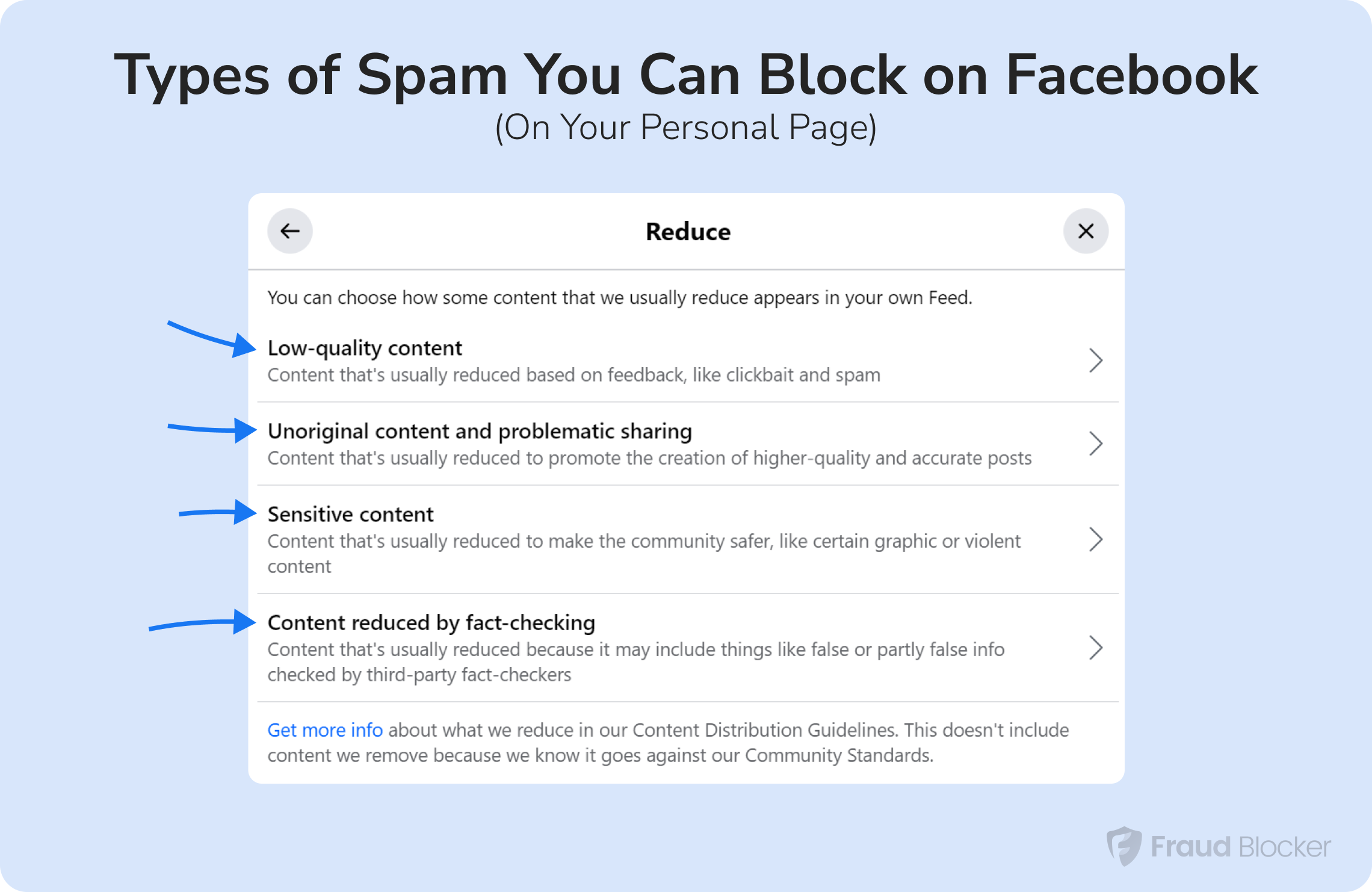
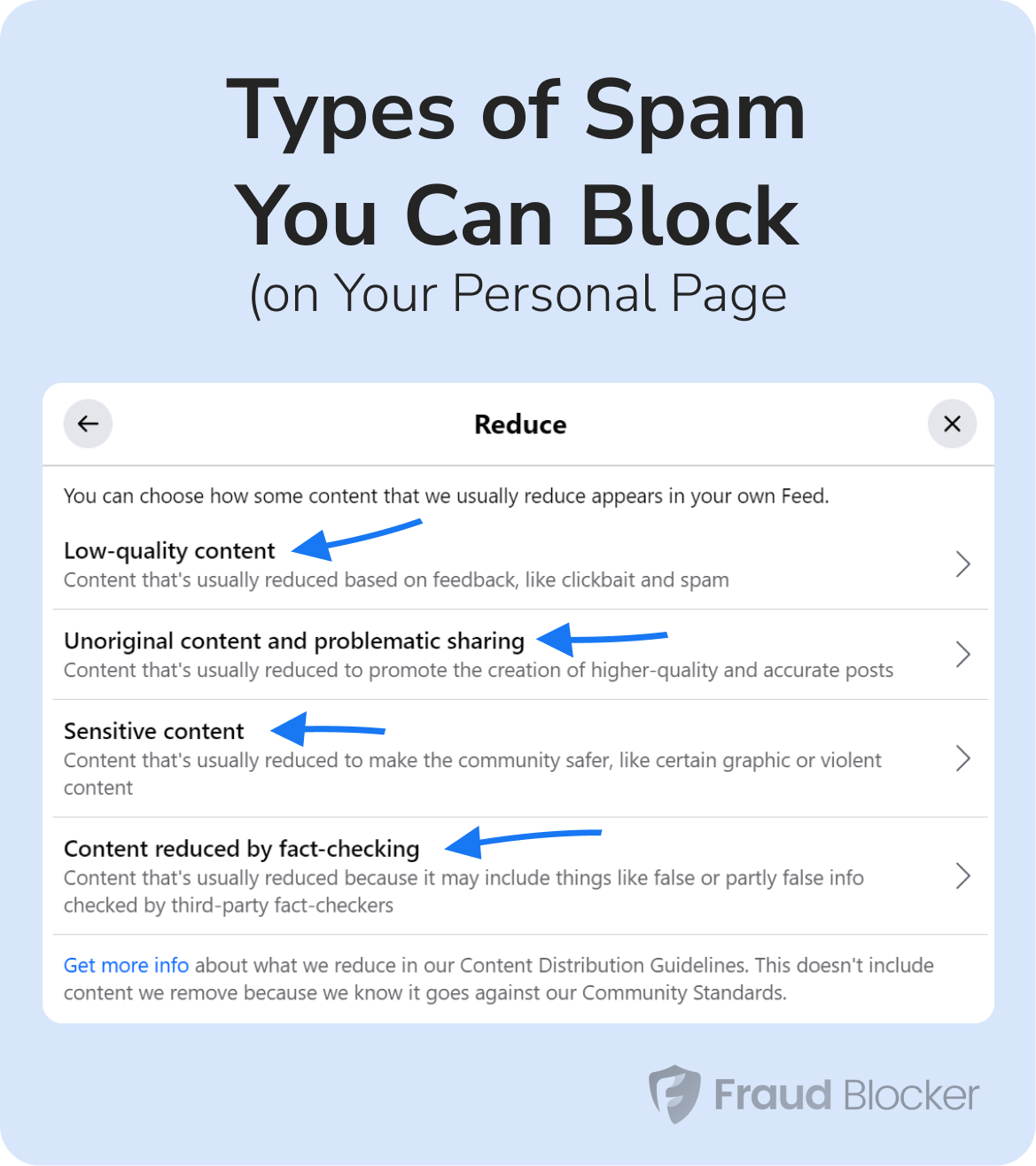
Types of Facebook spam and bot filters available.
Here are the 4 types of spam and bot filters available for your personal Facebook account:
#1 — Reduce content from fake accounts, spam and clickbait:
You can reduce your “Low Quality Content” that includes poor quality videos (such as videos with images), spam and clickbait articles. You can also reduce content from accounts that are fake and created by bots. We recommend turning on the highest setting here.
#2 — Reduce repetitive content:
This is often due to bot script that copy-and-paste the same comment or posts over hundreds of accounts, often to sell a product or promote their own page.
#3 — Reduce sensitive content:
This one is obvious. Spam comes in many forms, but graphic and violent content drives emotions and often clicks. Reduce this one.
#4 — Reduce false content, including AI-altered images:
Manipulated images is a big problem today and it’s difficult to tell what’s real or not. Bot-generated images can be blocked by turning this filter on it’s maximum setting.
Here’s where to access these filters in Facebook:


Step-by-step instructions to filter Facebook spam bots.
If you run a business page on Facebook, then you only have 2 spam filter options: keywords and profanity.
Here’s how to access those in your business page account:
Bots are everywhere, including clicking on your online ads.
Fraud Blocker can help boost your ad performance by removing bots, accidental clicks, and more from your advertising campaigns. Try our 7-day free trial and see how much money we can save you.
Further related reading: