


7 Critical Lessons About Click Fraud After Analyzing 200M Ad Clicks
From AI bots to industrial click farms, see the 7 click fraud patterns we found based on our analysis of 200 million ad clicks.



Our AI agents catch the sophisticated fraud others miss and it tells you why. Learn more here.



Click fraud is costing advertisers billions in loses. Learn more here.

Click fraud is costing advertisers billions in loses. Learn more here.


Read our in-depth study by independent research firm Juniper Research.



 Key Takeaways
 Bot activity on LinkedIn has increased approximately 50% annually over the past three years, according to the platform’s transparency reports. While LinkedIn claims its automated defenses catch 96% of fake accounts before users interact with them, the sheer volume of bots (200 million removed in 2024 alone) and bot-generated spam content shows the scale of the problem.
For advertisers, this matters beyond fake connection requests: the same bot networks that create fake LinkedIn profiles also generate fraudulent clicks, fake leads, and polluted audience data across every major ad platform.
We analyzed LinkedIn’s transparency data to reveal exactly how many bots infiltrate the platform each year. This guide covers common bot tactics, red flags to watch for, and actionable steps to protect yourself from LinkedIn scams and bot-driven ad fraud.
sending connection requests, interacting with posts, or scraping user data. In many cases, these bots create and operate fake accounts designed to mimic real professionals. But, LinkedIn bots can also automate activities on real user accounts through browser extensions and unauthorized scripts.
There are two categories of LinkedIn bots:
While LinkedIn’s explicitly prohibits both, this article will be primarily discussing fake account bots.
 Expand to view chart data
 | PERIOD | BOTS STOPPED AT REGISTRATION | BOTS RESTRICTED PROACTIVELY | BOTS REMOVED AFTER REPORTS |
|---|---|---|---|
| H1 2025 | 61.2M | 22.2M | 385.9K |
| H2 2024 | 80.6M | 19.7M | 265.7K |
| H1 2024 | 70.1M | 16.2M | 262.9K |
| H2 2023 | 46.3M | 17.1M | 232.4K |
| H1 2023 | 42.5M | 15.1M | 196K |
| H2 2022 | 44.7M | 13.2M | 201K |
| H1 2022 | 16.4M | 5.4M | 190K |
| H2 2021 | 11.9M | 4.4M | 127K |
| H1 2021 | 11.6M | 3.7M | 85.7K |
| H2 2020 | 11.6M | 3.0M | 111K |
| H1 2020 | 33.7M | 3.1M | 103.1K |
| H2 2019 | 7.8M | 3.4M | 85.6K |
| H1 2019 | 19.5M | 2M | 67.4K |
Source: Linkedin's transparency report
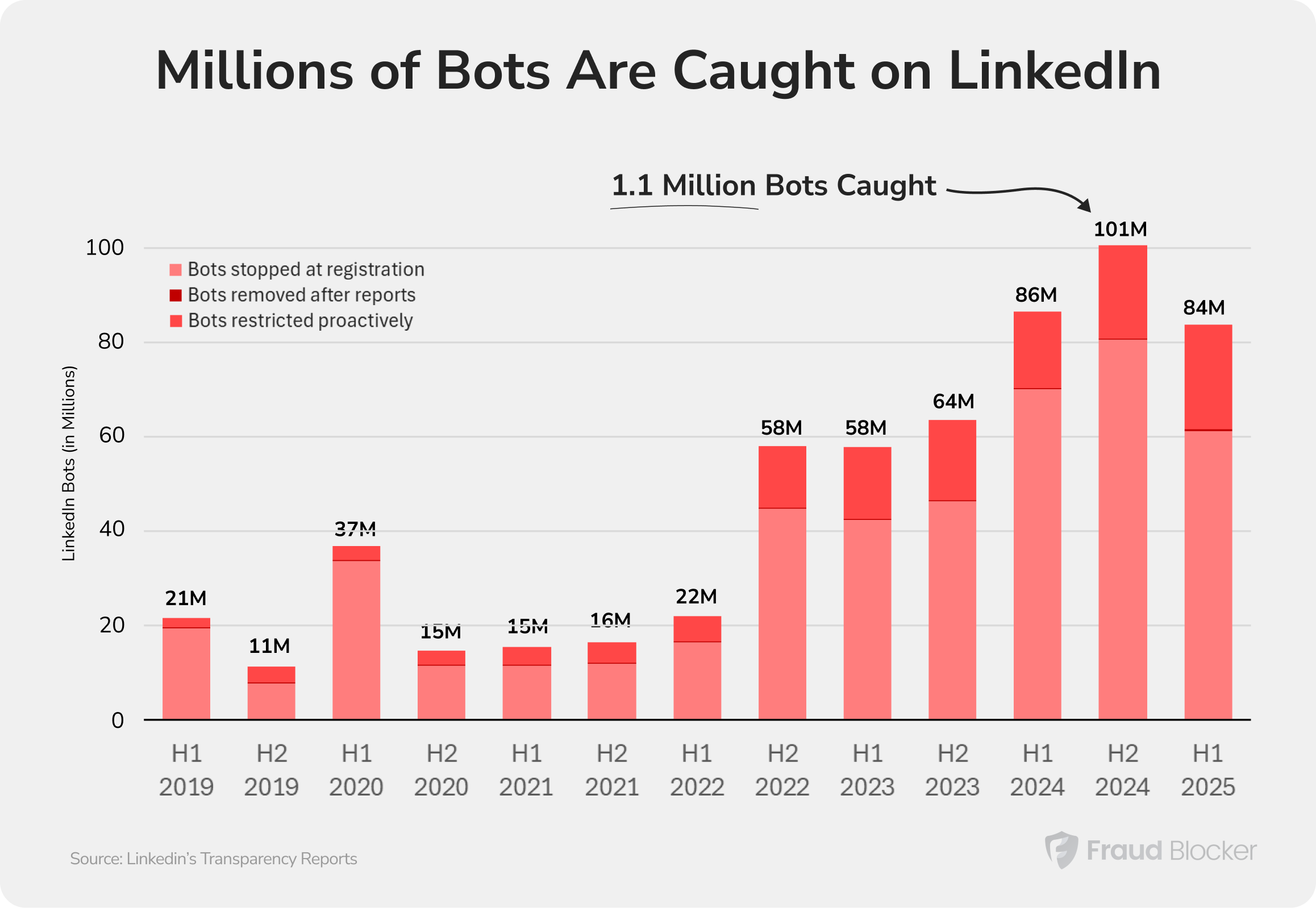
There were over 200 million bots on LinkedIn in 2024. According to transparency reports, these bot accounts are no longer on the site, and 75% of them were new bot accounts blocked at registration. But, this means that LinkedIn essentially removed 16% of its 1.2 Billion user base in fake accounts in a single year.
The data below reveals the scale of LinkedIn’s bot problem:
But bot accounts aren’t the only problem; there’s also the issue of spam and scam-related content.
The same transparency reports show that LinkedIn removed over 252 million pieces of content in 2024. That means spam and scam-related content has grown 80% on LinkedIn over the past 5 years.
Methodology: We looked at LinkedIn’s transparency reports every year, and pulled the old reports from the wayback machine to stitch this data together
The increasing bot activity on LinkedIn has direct consequences for your advertising campaigns:
LinkedIn bots use automated scripts to perform actions that would take humans hours or days to complete manually. At a basic level, these involve actions like creating accounts, sending connection requests, and leaving comments.
But these add up to more malicious results, for both users and marketers.
In 2022, Yahoo news reported that North Korean fraudsters copied resumes and professional profiles from legitimate LinkedIn and Indeed accounts to apply for real jobs at cryptocurrency companies and other tech firms.
The scheme was effective because the copied profiles look entirely authentic, being based on real people’s actual career trajectories. Some of them even held up to scrutiny!
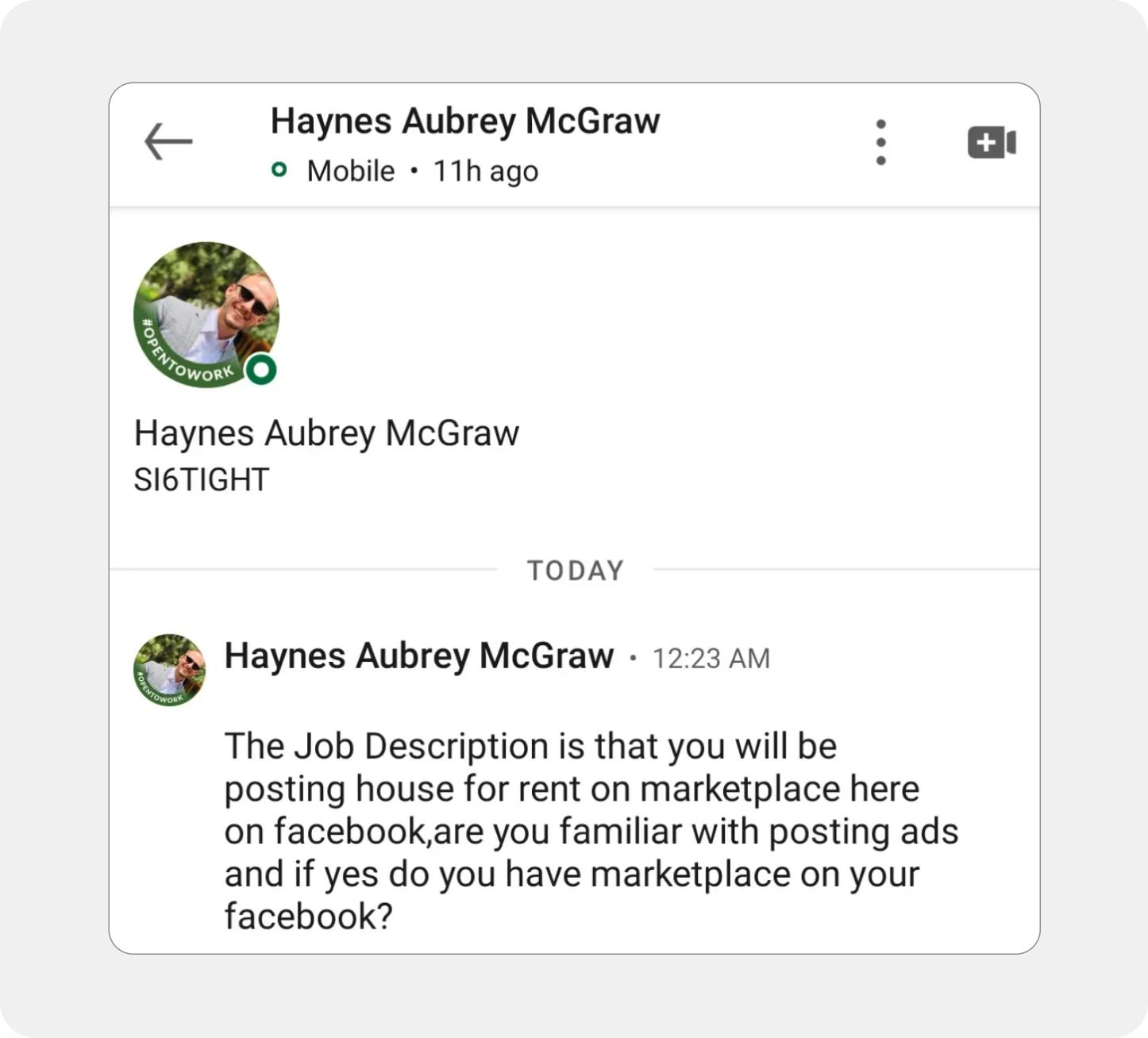
Here, fake recruiters will create convincing job postings for high-paying remote positions, then use the application process to harvest sensitive personal information. The victims may be asked to provide Social Security numbers, bank account details for “direct deposit setup,” passport scans, or copies of driver’s licenses (all data that can be used for identity theft or sold on the dark web.)
Some scams even recruit accomplices by asking “new hires” to use their real accounts to create fake marketplace listings or process fraudulent transactions.
Fake profiles pose as successful professionals who build trust over weeks or months before introducing fraudulent “investment opportunities” with fabricated proof of profits. Commonly known as a “pig butchering scam,” the victim ends up losing all their invested funds.
Phishing attacks on LinkedIn also follow a similar pattern. Bots send links mimicking trusted platforms like Gmail or Google Drive, then steal credentials when victims log in.


Bot accounts flood invite-only LinkedIn groups with hundreds of fake profile requests, trying to join closed communities where professionals share sensitive industry information. According to a report on Krebs on Security, some groups, like Sustainability Professionals (300,000+ members) receive dozens of fake requests weekly.
Once inside these exclusive groups, bots can monitor confidential discussions. They also have access to a database of verified professionals in specific industries, ideal targets for tailored phishing attacks and employment scams.
These tactics don’t stay on LinkedIn. Bot networks that build fake professional profiles can also generate fraudulent ad clicks, or fill lead forms with fake data and cost advertisers billions annually across Google Ads, Meta, and other networks where you advertise.
Besides removing millions of fake accounts every year, here are some of the strategies LinkedIn is using to tackle bot accounts.
Despite these strategies, there are still lots of bot accounts on linkedin. Which brings us to how you can tell these fake accounts from real users.

LinkedIn’s “About this profile” feature shows when an account was created, last updated, and what information has been verified. Profiles with verification badges provided real-world evidence and are far more likely to be legitimate.
Bot accounts often display inflated follower counts despite being recently created or never posting content. Some hide low connection counts using custom link titles. High followers with minimal activity is a red flag.
Bot-generated posts and comments are repetitive, add little value, and don’t reflect real human communication. Many are also designed to rapidly increase connections and build false trust signals.
Fake profiles often appear authentic by copying information from real users. Like in this example, the fake profile posing as CISCO of ExxonMobil lifted their “About” section directly from another, real, user’s profile.
One telltale sign of a bot recruiter or HR person on LinkedIn is requesting to communicate via a gmail account. Sometimes these messages appear without request, maybe under a post or even as a reply to an unrelated comment.
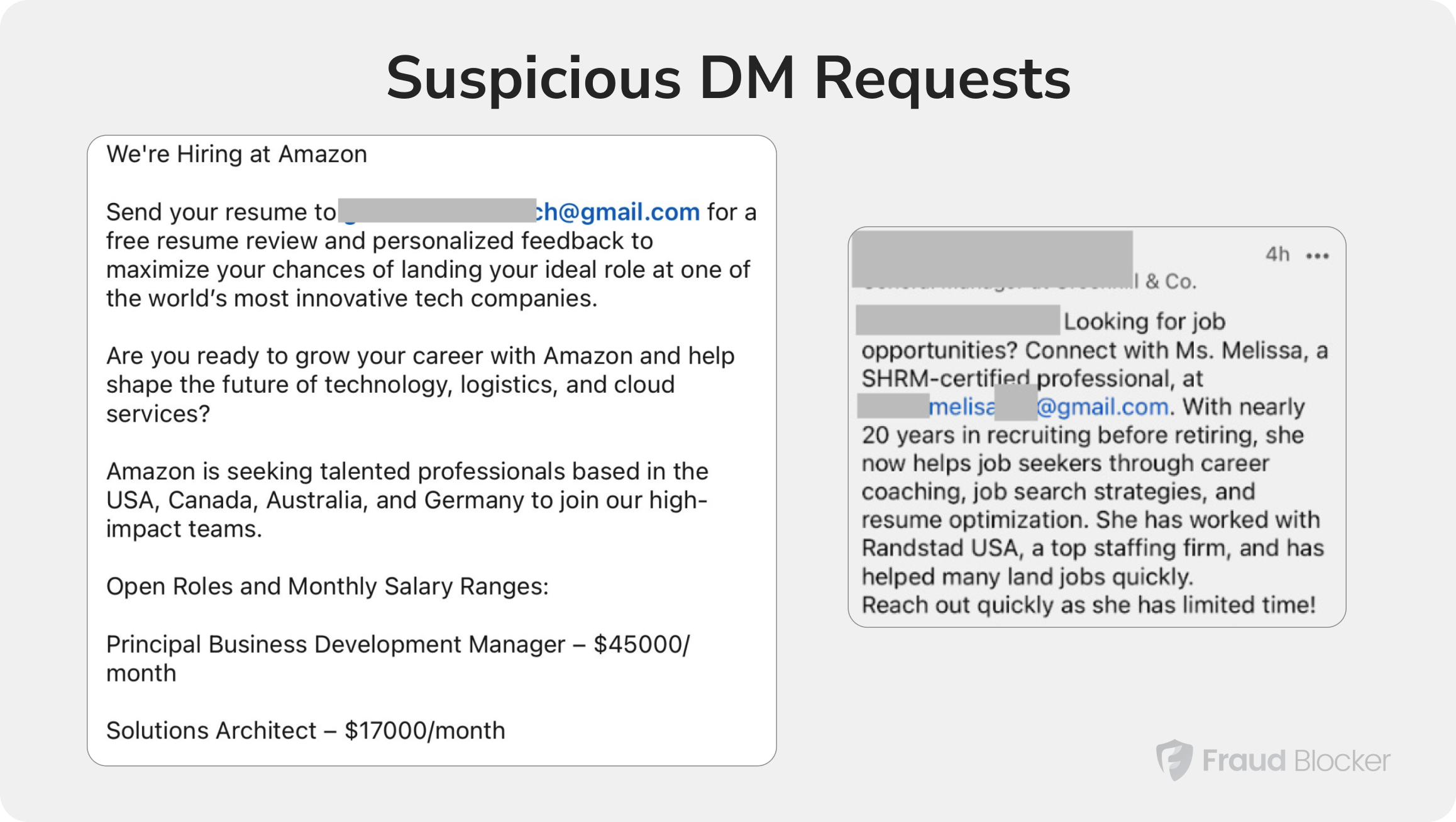
Other times, they may ask you to apply on an unfamiliar website, or provide confidential information for extra verification.
You can also spot fake job postings by bot accounts if you watch out for the right signals.
1. Report and block suspicious accounts
One of the easiest and most effective ways to keep bots from interfering with your LinkedIn experience is to report the account and then block them. Here are the steps:
Bot accounts often need to connect with you before initiating any meaningful interaction (messages leading to scams, phishing links, etc.) You can prevent most of this by simply vetting your connections.
LinkedIn already recommends only connecting with people you know. But sometimes, you need to expand your network. In that case, check profiles of potential connections, watching for the signs of bot activity we shared earlier.
Once you identify a fake job posting, report it to LinkedIn the same way you would report a suspicious profile:

Bot generated posts on LinkedIn are annoying, but they are a small part of a bigger issue: PPC click fraud.
The same bot infrastructure behind 200 million fake LinkedIn accounts can also target your paid advertising campaigns. If you run Google Ads or Meta Ads, your campaigns are exposed to fraudulent clicks, fake leads, and wasted spend from automated bot traffic.
Fraud Blocker detects and blocks this fraudulent activity in near real-time across your Google Ads and Meta Ads campaigns, using intelligent detection powered by 100+ signals, including device fingerprinting, VPN detection, and behavioral analysis.
Start your 7-day free trial (no payment required) and see how much of your ad traffic is actually real.
LinkedIn removed 200 million bot accounts in 2024, according to its transparency reports. That represents 16.7% of the platform’s 1.2 billion stated user base. In H1 2025, the removal rate was 83.7 million accounts in just six months, and LinkedIn’s automated defenses caught 97% of them before any user reported them.
A LinkedIn bot is any software or script that automates actions on the LinkedIn platform, including sending connection requests, interacting with posts, or scraping user data. Many bots create and operate fake accounts, pretending to be real professionals, but some also automate activities on already existing accounts.
LinkedIn’s bot problem wastes advertising budgets through fake impressions and clicks that never convert. With invalid traffic rates at 19.8%, bots on LinkedIn can also inflate CPCs, provide fake leads, and skew your future campaigns so they target similar bot profiles.

ABOUT THE AUTHOR
Matthew is the resident content marketing expert at Fraud Blocker with several years of experience writing about ad fraud. When he’s not producing killer content, you can find him working out or walking his dogs.
Matthew is the resident content marketing expert at Fraud Blocker with several years of experience writing about ad fraud.
