

6 Major Advantages Microsoft Ads Has Over Google Ads
Six huge advantages Microsoft Ads (Bing Ads) has over Google, including lower CPCs, Copilot ad placements, LinkedIn targeting, and more.


We improve your ad performance by blocking click fraud and fake emails



Click fraud is costing advertisers billions in loses. Learn more here.

Click fraud is costing advertisers billions in loses. Learn more here.


Read our in-depth study by independent research firm Juniper Research.



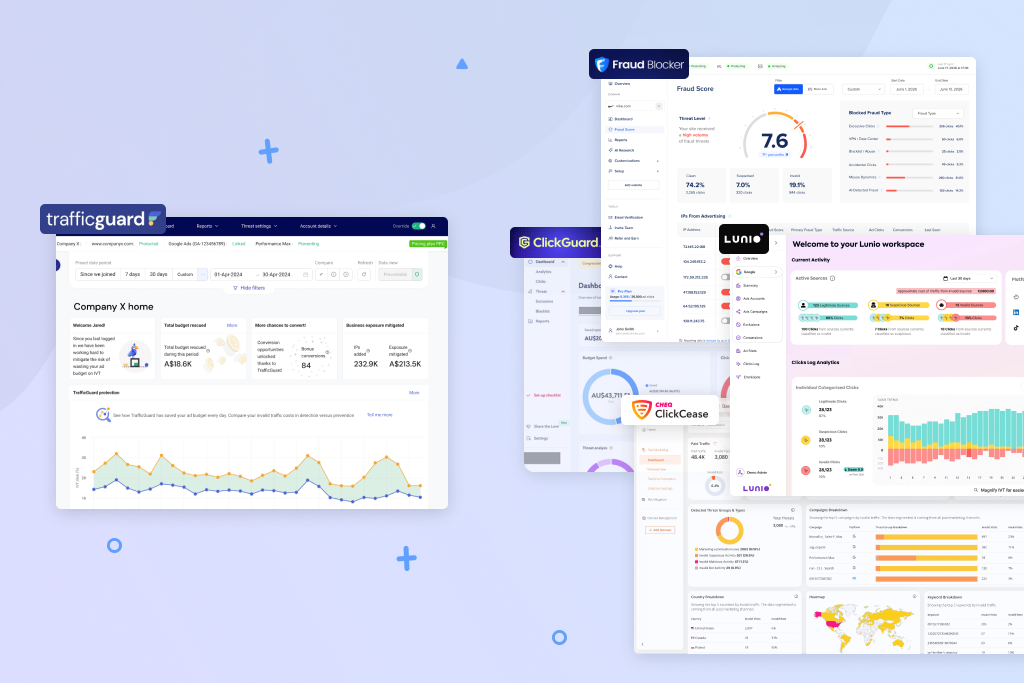
Thinking about switching from TrafficGuard? You’re not alone. While it protects campaigns across several networks, advertisers often hit a wall with its pricing jumps, setup time, and lack of transparency.
TrafficGuard is an effective tool but isn’t the best fit for every advertiser, especially if you don’t want to spend hours on setup or you’re running a mid-sized campaign without an enterprise-level budget.
Here’s a look at some tools worth your consideration and why they are an excellent alternative to TrafficGuard. We also cover what TrafficGuard does well and the specific reasons advertisers look elsewhere.
TrafficGuard (trafficguard.ai) is a click fraud and ad fraud protection platform based in Australia. It features multi-channel coverage, protecting campaigns across Google Search and Performance Max, as well as Meta, affiliate campaigns, and mobile app installs. This coverage makes it valuable for advertisers running an extensive ad catalog across multiple platforms.
The platform also generates transparency reports that document blocked invalid clicks. Advertisers can use this to file refund claims with Google, which is another advantage for advertisers spending a lot on Google ads. Industry estimates say Google misses as much as 5.8% of invalid clicks, so this cataloging can make it easier for advertisers to recover some loss.
Previously, TrafficGuard offered a free tier for advertisers with budgets under $2,500/month, but that’s no longer the case. The only free option now is a 30-day trial that covers detection only, not active protection.
According to reviews on G2 and Capterra, advertisers mention three major pain points with TrafficGuard: pricing, setup complexity, and the transparency on how blocking decisions are made.
Even though the platform has a 30-day free trial and an entry tier, they are both very limited. The former only identifies invalid clicks but won’t block them. The latter, its Shield plan, starts at $49/month and only protects Google Search for up to $30k in monthly spend.
Advertisers who need to protect PMax or Meta campaigns have to move to the next tier, which now requires contacting TrafficGuard directly, as pricing is no longer published on its website. Previous pricing information cited 2% of overall marketing spend. If that figure still holds, an advertiser spending $100k/month would pay around $2,000/month for ad fraud protection.
This jump between $49/month and a percentage of overall spend is a major pain point for advertisers, repeated in reviews like this. As one Capterra reviewer put it, “I could see as we increase our budgets, it might be a bit expensive.”
TrafficGuard requires advertisers to configure their own detection rules for filtering invalid traffic instead of a simple plug-and-play setup. Support is available to help, but reviewers still describe having to set aside time to get the tool up and running. As one reviewer states, “You need to be very patient and really want to use it to understand how to take the best advantage of it.”
Beyond the pricing and setup, reviewers also complain about the “black box” nature of the platform. It can be hard to tell exactly what’s being blocked and why.
Advertisers still need extra click fraud protection beyond what ad platforms provide on their own. Data shows that some advertisers lose as much as $4,560 annually on a $10k monthly budget.
Below we share tools that can help you block click fraud on your ads while addressing Traffic Guard’s main shortfalls. If you’re comparing options or considering a switch, consider the following.
Advertisers who want automated Google Ads refund recovery in addition to standard click fraud blocking.
In addition to blocking fake clicks, fraud0 is focused on helping advertisers recover the ad spend already lost from invalid traffic. This feature is included in every plan, and the tool automatically generates and submits the documentation needed for an invalid click refund claim on Google.
On the protection side, it covers Google Ads, Meta, and Microsoft across every tier. Setup is easy and takes about 5 minutes, according to the tool’s own reporting.
fraud0 starts at €50/month for up to 50,000 site sessions. All plans also include a 33.33% success fee on any ad spend recovered through its refund automation process.
The biggest con of fraud0 is the pricing structure, which includes the flat monthly fee and a 33% success fee on recovered ad spend.
If the tool blocks invalid clicks on your behalf and successfully requests refunds for them, the 33% fee is added to your base subscription and will vary depending on how much invalid traffic is in your campaigns.
As one G2 reviewer put it, “Shops would need a sufficiently high ad spend to make this tool profitable. When you are a small shop, the price for this tool might be too high.”
If getting money back from Google is as important to you as stopping click fraud in the first place, fraud0 is a great choice. TrafficGuard generates transparency reports that can support your refund claims, but they aren’t automatically submitted.
Google and Meta advertisers who want transparent pricing and a clear fraud scoring on every blocked click.
Fraud Blocker blocks invalid clicks across Google and Meta ads, assigning a Fraud Score to every blocked click. This score is visible in the dashboard and gives advertisers insight into their campaign performance.
Beyond core blocking, Fraud Blocker also includes an AI research tool that pulls from more than 50 data points. You can chat directly with your data, and it’s great for understanding campaign performance data in a “more natural way that’s not clear by just looking at tables or graphs,” as one G2 reviewer put it.
The tool also includes other features, such as
Fraud Blocker starts at $79/month for 5,000 ad clicks. A 7-day free trial lets you test it out with no charge until the trial expires.
Fraud Blocker currently protects Google and Meta ads campaigns. It also offers detection and scoring for most other ad platforms, but this means advertisers running ads on these platforms (TikTok, LinkedIn, or programmatic campaigns, etc.) will need a tool with broader platform coverage to enjoy full protection.
Fraud Blocker’s flat-rate pricing means your protection costs stay predictable as your spend scales. That plus the Fraud Score, which shows you which clicks were flagged and why, make Fraud Blocker an excellent alternative to TrafficGuard.
Advertisers who want to set their own blocking rules per campaign.
ClickGuard gives advertisers more than 50 configurable features and lets them add blocking rules for each campaign. That means thresholds, frequency caps, and conditions can be modified per campaign, which is important if you’re running campaigns with different traffic profiles.
The forensic data is another standout feature. ClickGuard shows you the full visitor data behind every blocked click, including details like device, IP, behavior pattern, and the specific rule that triggered the block. It’s great for PPC managers who want to audit what’s happening rather than just trust an algorithm.
ClickGuard starts at $89/month for up to $5k/month in ad spend. Higher-tier plans have greater spend thresholds and include features like blacklist management and better reporting.
The tradeoff with ClickGuard is that the “rules setup can be daunting,” as stated by a reviewer on G2. This is a common complaint since advertisers need to configure their own rules to set up campaigns properly. This can be a challenge for teams who don’t have the time to either learn the system or reach out to support for help with setup.
If you want to define exactly what gets blocked and why at the campaign level, ClickGuard is the perfect solution for that. It does require greater commitment in the beginning but is excellent for teams that have the time to build and refine their own rules.
Teams that want published pricing and visual proof of fraud through session recordings.
ClickCease covers Google, Meta, and Microsoft Ads and includes session recordings, a feature that’s missing from TrafficGuard’s offerings.
Session recordings let you watch exactly how a flagged visitor interacted with your site, including what they clicked and how long they stayed. It’s a great way to review invalid clicks and understand how bots are engaging with your site.
ClickCease also features PPC tool add-ons like AdSpy, which lets you track competitor ad copy and keywords, and Lead Shield for Hubspot, which blocks bot submissions on your forms.
ClickCease starts at $99/month for 5,000 total traffic and 250 HubSpot leads. Higher-tier plans let you customize your pricing based on how much total traffic to block.
Many advertisers have complained about ClickCease’s pricing, which looks good on the surface but can be costly for small- to medium-sized businesses.
The pricing model counts all traffic (including organic page views) as part of your monthly quota. That means sites with high organic traffic will burn through their plan quickly, even if they get fewer paid clicks.
Also related to cost, users have complained about ClickCease’s lock-in contract. After the initial trial, users get locked into a 3-month minimum billing system, making it harder to conduct an extended trial or make objective decisions.
Published pricing and session recordings are the two clearest reasons to pick ClickCease over TrafficGuard. It offers full protection across the same networks as TrafficGuard, and you can clearly see how your pricing changes as need scales.
Advertisers running campaigns across several platforms who want fraud signals shared automatically between channels.
Lunio (originally PPC Protect) covers 11 ad platforms (Google, Meta, and Microsoft) as well as social media platforms like TikTok, LinkedIn, and Reddit. Its standout feature is cross-channel exclusion that ensures IPs flagged on one platform (e.g., Google Ads) are blocked across all of your channels (LinkedIn, Meta, and even X).
Setup on Lunio only takes a few minutes, according to their website, and advertisers who don’t want blanket rules can customize rules, including click thresholds, frequency caps, and more.
Lunio doesn’t publish its pricing, but it does use a spend-based pricing model like TrafficGuard.
The lack of transparent pricing is the most consistent complaint from reviewers. As one G2 user put it, “The pricing isn’t very transparent up front, which can make it harder to evaluate at the start.” There’s also no clear cancellation option in the dashboard, which creates friction when advertisers want to leave.
The 14-day audit period also has limitations. It shows the fraud data in your ads but doesn’t block anything, which defeats the purpose of a trial period for many advertisers.
If you’re running campaigns across many platforms and want to protect all your campaigns with a single solution, Lunio is a great pick.
Advertisers running campaigns across 30+ ad networks beyond just Google and Meta.
Spider AF supports Google, Yahoo, Meta, Microsoft, and additional ad platforms. It is excellent for advertisers running ads on platforms beyond just Google and TikTok and agencies managing clients across a diverse mix of channels.
Beyond standard click blocking, Spider AF also includes fake lead protection and scans your website for third-party script vulnerabilities. The script scanning feature can catch things like unauthorized tracking tags and malicious scripts.
Spider AF starts at $150/month for up to 500,000 monthly clicks.
It’s one of the more expensive options here, which puts it out of reach for smaller teams watching their budget. Users also complain about a lack of transparency, including this reviewer who states the need for more insight into exactly what’s being blocked and why.
Spider AF has broad platform coverage, much more than TrafficGuard offers. This makes it the go-to for platforms seeking a single solution to manage a diverse portfolio of channels.
| Features | TrafficGuard | Fraud Blocker | fraud0 | ClickGuard | ClickCease | Lunio | Spider AF |
|---|---|---|---|---|---|---|---|
| Starting price | $49/mo | $79/mo | €50/mo | $89/mo | $99/mo | Available on request | $150/mo |
| Platforms covered | Google Search only (on the entry plan), Meta, mobile, affiliate at enterprise | Google, Meta | Google, Meta, Microsoft | Google, Meta, Microsoft | Google, Meta, Microsoft | 11 platforms | 30+ ad networks |
| Pricing model | Flat $49 (Shield) / 2% of spend above $30k (Scale) / Enterprise custom | Flat monthly | Flat monthly + 33% refund success fee | Flat monthly | Flat monthly (visit-based) | Spend-based | Flat monthly |
| Free trial | Free detection up to $2,500/mo ad spend | 7 days, full blocking | Free plan available | 7 days | 7 days | 14-day audit (detects only, no blocking) | Free trial |
| Email verification on forms | No | Yes. Full verification + IP block | Partial, bot detection only | No | Partial, HubSpot forms only | No | Partial, fake email flagging |
| Instant performance boost | No | Yes | No | No | No | No | No |
| Behavioral signal detection | Yes, mouse movement, scroll, behavioral models | Yes, mouse movement, scroll, timing | Yes, mouse movement, typing rhythm | Yes, mouse movement, scroll behavior, session duration | Yes (methodology not publicly documented) | Yes (methodology not publicly documented) | Yes (methodology not publicly documented) |
| Best for | Mobile fraud and affiliate protection at enterprise scale | Google/Meta advertisers who want full transparency | Recovering refunds from Google | Campaign-level rule control | SMBs who want session recordings | Blocking across 11+ platforms | Agencies with diverse channel mixes |
Sources: Vendor pricing pages, G2, and Capterra as cited throughout this article. Feature availability reflects publicly disclosed information as of September 2026 and may change.
If you’re shopping for alternatives to TrafficGuard, it makes sense to pick a solution based on your campaign setup, ad spend, and ad platforms. Here are some alternatives sorted by use cases.
TrafficGuard is a capable tool, but the jump from $49/month to enterprise pricing leaves a lot of advertisers without a good middle option. If you’re running Google and Meta and want straightforward protection with clear reporting, Fraud Blocker is the strongest alternative. It offers transparent pricing, a Fraud Score on every click, and a 7-day free trial with no charge upon activation.
For more specific needs, the other tools here are worth considering: fraud0 for recovering refunds from Google, ClickGuard for granular campaign-level rule control, and Spider AF for advertisers running across 30+ ad networks.
You can start with a 7-day free trial of Fraud Blocker.

ABOUT THE AUTHOR
Matthew is the resident content marketing expert at Fraud Blocker with several years of experience writing about ad fraud. When he’s not producing killer content, you can find him working out or walking his dogs.
Matthew is the resident content marketing expert at Fraud Blocker with several years of experience writing about ad fraud.