

6 Major Advantages Microsoft Ads Has Over Google Ads
Six huge advantages Microsoft Ads (Bing Ads) has over Google, including lower CPCs, Copilot ad placements, LinkedIn targeting, and more.


We improve your ad performance by blocking click fraud and fake emails



Click fraud is costing advertisers billions in loses. Learn more here.

Click fraud is costing advertisers billions in loses. Learn more here.


Read our in-depth study by independent research firm Juniper Research.



Even though Google dominates search advertising with a broader network and larger user base, Microsoft Ads offers real advantages for advertisers. Lower CPCs and full search term visibility are two of the most significant.
This guide breaks down six of the strongest advantages Microsoft Ads has over Google Ads and shows you how to run campaigns on both platforms without doubling your workload.
Microsoft runs a smaller advertiser base than Google. There’s less competition per keyword, lower auction pressure, and thus, lower CPCs. According to some industry estimates, the difference is as much as 30-50% for comparative keywords between Bing and Google. Specific figures vary, but sources like Improvado put the difference at between $1.35 and $2.46 per click on average.
This is a big deal for advertisers because it means you can bid for more keywords, expand your search, and even experiment with new audiences without watching your costs balloon.
With Google search, CPCs vary by industry, with some of the most expensive keywords costing hundreds of dollars. And at that level, every missed click can cost a lot.
While Google dominates the ad display landscape, Bing Ads gives advertisers access to placements and partner sites that are otherwise out of reach. Bing, DuckDuckGo, Yahoo, AOL, and Ecosia all serve ads exclusively through Microsoft, and the only way to show ads to these audiences is through the platform.
The value here is that you can reach non-overlapping audiences and broaden your reach. DuckDuckGo alone processes around 100 million daily searches and caters to an audience that’s more privacy-centered and averse to Google properties. Microsoft Ads is one of the only viable ways to reach this audience.
The same logic applies for all the other partner search engines.
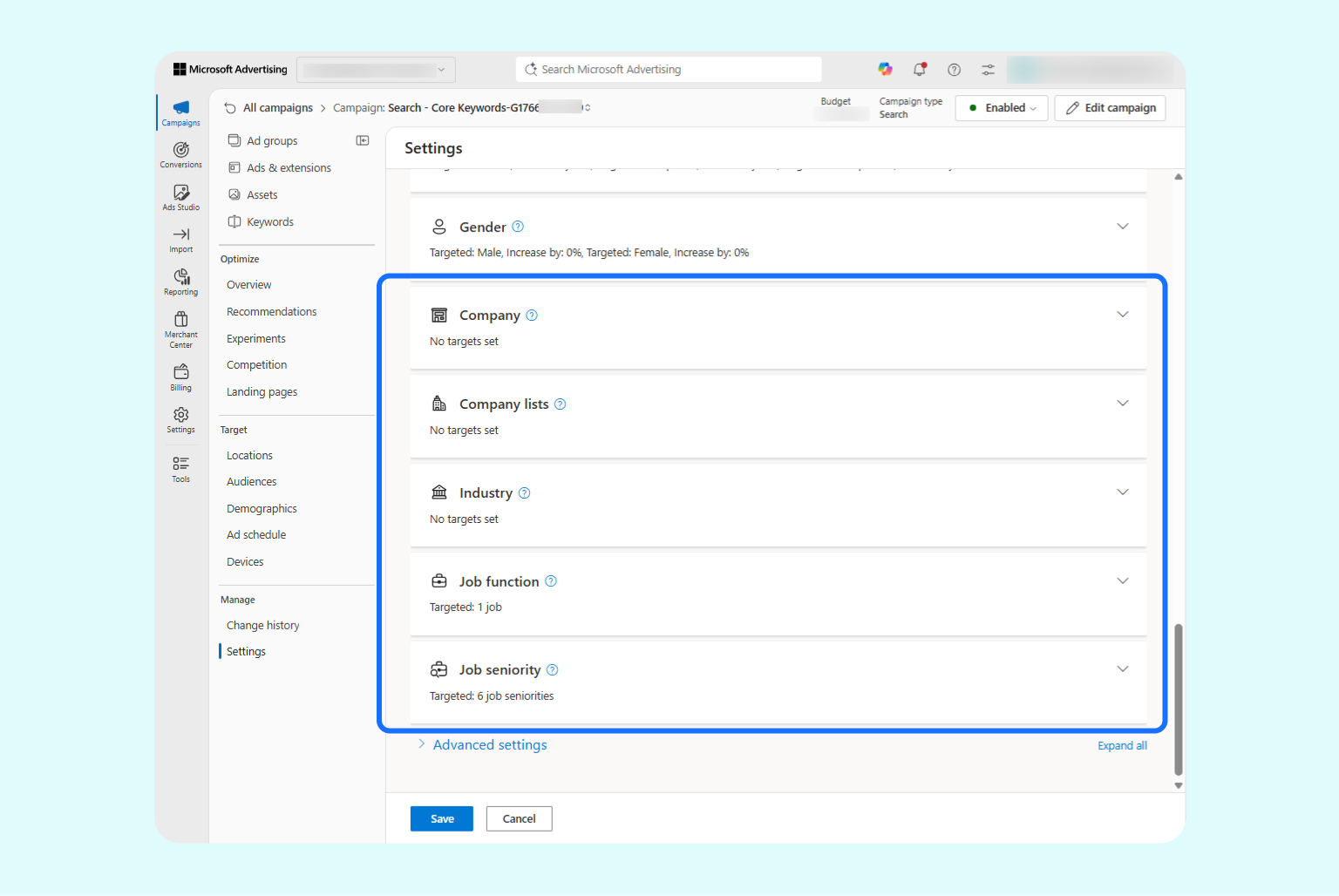
Microsoft owns LinkedIn, and it allows advertisers to tune audience targeting based on LinkedIn profile data. That includes company, industry, job function, and seniority level.
This has been available since 2020 and gives advertisers a whole new way to optimize campaigns.
Google Ads gives you several ways to reach people, including the keywords they search, audience segments built from their interests and online behavior, and your own customer data. These tools are effective, but they mostly describe what someone is doing or looking for, not who they are professionally. A person researching a topic out of curiosity can look a lot like a qualified buyer.
Microsoft Advertising adds a LinkedIn profile targeting layer to what Google offers. You can target individuals based on relevance, including their job functions, industries, and company, all pulled from LinkedIn profile data. This not only improves who sees your Bing ads but also how you write them. You can create ads that zero in on user profiles instead of anyone who happens to be interested.
Read more: How to fix flaws in Google’s interest-based targeting for your ads

Ads inside AI conversations aren’t new, and we covered ChatGPT’s ad offering when it launched in February 2026. But Microsoft has had ads running inside Copilot since 2023, and what makes this placement valuable is how naturally it integrates into the conversation flow.
Product recommendations appear in direct response to what the user is discussing and can be naturally integrated as a part of the answers users expect.

Ads already running on Microsoft are automatically eligible for Copilot slots, and there’s no opt-in required. Supported formats include:
At the time of writing, Google has no similar ad integration in its Gemini, and the VP of Global Ads, Dan Taylor, stated on X (formerly known as Twitter) that there are no plans to roll it out. That makes this another positive for running ads on Microsoft.

Advertisers running Microsoft campaigns are able to see search terms for nearly 100% of clicks that incurred a cost. With Google, that figure is closer to 50%, a limitation advertisers have long pushed back on.
Google’s official position is that only terms searched by a “significant number of users” are visible, but that creates a blindspot for anyone trying to understand where their budget is going.
With Microsoft Ads, nearly every query that results in a click is logged and exportable, giving you a complete performance picture of which terms convert, which don’t, and where spend is being wasted.
This means you can optimize campaigns with precision, build more complete negative keyword lists, identify underperforming queries, and make confident decisions about where to push budget and where to reduce it.
This final point isn’t so much a competitive advantage as it is a low barrier to entry: you can port your existing Google Ads campaigns into Microsoft without rebuilding from scratch.
Microsoft’s documentation breaks down the full process, from setting up a credential ID to customizing what gets imported.
The practical upside is that all your existing campaign groundwork (keyword lists, negative keywords, ad copy tests, and campaign structure) transfers over, and you can fine-tune Microsoft-specific details like audiences and bid adjustments.
These unique features are not a reason to switch from Google to Microsoft. Google is where the bulk of search volume is, so we recommend using Microsoft Ads as a complementary platform, not a replacement. Many advertisers run campaigns on both platforms simultaneously, with varying budget levels, which is our approach as well.
Google holds roughly 90% of the global search market share and gives advertisers access to a much larger user pool. But as the points above show, Microsoft offers real advantages with lower CPCs, access to new audiences, and search term transparency.
Our recommendation is to use these Bing Ads features more extensively, together with Google. Here are 3 ways to combine your approach.
Google’s volume makes it the natural place to start, as it allows you to validate your offer, test keywords and creativity, and identify what works.
Once a campaign proves effective, you can use Microsoft’s import feature to replicate the structure on the Bing network.
Note: Some audience settings and bid adjustments will carry over, but not all. We recommend reviewing what imported and adjusting what didn’t. Install Microsoft’s UET tag early so remarketing lists can start populating with new traffic. Then incorporate audience bid strategies once those lists have enough data to be meaningful.
Google has several exclusions we recommend setting up to prevent wasted spend from invalid clicks and low-quality traffic. We’ve covered these in our guide on exclusions to stop wasted ad spend in Google Ads. And since both platforms share similar mechanics (automated bidding, broader network delivery by default), it’s a good idea to audit the same exclusions on the Microsoft side too.
Below is a breakdown of the key exclusions to consider in Microsoft Ads and how each maps to its Google equivalent.
| Exclusion | Google default | Microsoft default | What to do on Microsoft |
|---|---|---|---|
| Location targeting | New campaigns are set to broad "Presence or Interest" targeting by default | Similar intent-based targeting | Narrow targeting to people physically in your target locations |
| Network exclusions | Search Partners checked by default. Display Network now unchecked by default in an increasing number of accounts | Standard Search campaigns include Audience Network delivery by default, with no full opt-out available | Review placement performance in your reports, then use the exclusions available for your campaign type to remove underperformers, with a clear reason for each. |
| Negative keywords | Off by default. Need to be added manually | Also off by default | Be sure to add negative keywords across your campaigns |
| Audience exclusions | Off by default | Off by default. You need to manually exclude audiences from your campaigns | Exclude converted users and underperforming segments the same way you would on Google |
| Placement/MFA exclusions | Manual, though many third-party curated lists exist | Manual, via Website Exclusion Lists; no equivalent curated list is published for Microsoft's network | Build your own list from placement reports and exclude accordingly |
| Budget/bid strategy caution | Default new campaigns often move toward automated strategies | New campaigns also default to semi-automated bidding | Be sure to start with capped strategies to keep spending under control |
| Auto-applied campaign changes | Off by default; opt-in only | Off by default; requires manual opt-in | Check your Auto-apply settings and turn off anything you don't want applied automatically |
Microsoft’s Search and Audience Networks give you access to different audiences. The Search Network is largely keyword-driven with broad reach and spans Bing, Yahoo, AOL, DuckDuckGo, and Ecosia.
With the Audience Network, however, Microsoft can target audiences using LinkedIn profile data, a level of professional targeting that isn’t available on Google. Use these to create uniquely focused campaigns and reach a broader audience.
Note: Microsoft doesn’t let you vary creative across the sites in each network. You can’t pick different ads for DuckDuckGo and Ecosia, for example. But you can still test different approaches across campaigns to find what resonates with each audience type.
Running ads on both Google and Microsoft gives you more reach, better audience coverage, and advantages you can’t get from any individual platform.
But broader reach also means a broader attack surface and higher risk for click fraud. Advertisers using Google Ads see an average invalid click rate of 11.4%, and a meaningful portion of that goes unrefunded.
Fraud Blocker monitors your Google Ads campaigns in real time, automatically blocking invalid traffic before it drains your budget. Try it free for 7 days and see exactly where your ad spend is going.

ABOUT THE AUTHOR
Matthew is the resident content marketing expert at Fraud Blocker with several years of experience writing about ad fraud. When he’s not producing killer content, you can find him working out or walking his dogs.
Matthew is the resident content marketing expert at Fraud Blocker with several years of experience writing about ad fraud.